
First 2 team dinners free · no card needed
GameDay Dinner: team dinner orders & payments in one link.
GameDay Dinner is a team dinner ordering tool for team meal coordinators: you text one link, and each family orders and pays for its own player's dinner. Parents pay you directly by Venmo, Cash App, Zelle or cash. You see who ordered and who paid, and send the order to the restaurant.
No more chasing screenshots, Venmo notes, and "wait, what did I order?"
See one dinner, start to finish
75 seconds, no sound. Set up, send the link, parents order and pay, you confirm and send it to the restaurant.
Right now, team dinner probably looks like this
- A group chat asking for orders, and a pile of replies, half of them "same as last time."
- Messenger threads with the families who aren't in the group chat.
- Venmo requests one family at a time, then scrolling notes to see who paid.
- An Excel sheet at 10pm to total it all up and text the restaurant.
It works. It's also four apps and your whole evening. The real problem is that the order and the payment live in different places. GameDay Dinner puts the meal, the pay button and the who-paid list behind one link.
How it works
- 1
Set up your team
Name your team and add your Venmo, Cash App or Zelle. About a minute.
- 2
Pick the menu, text one link
Choose a restaurant template or type the menu, then send the order link to your team group text.
- 3
Parents order and pay you
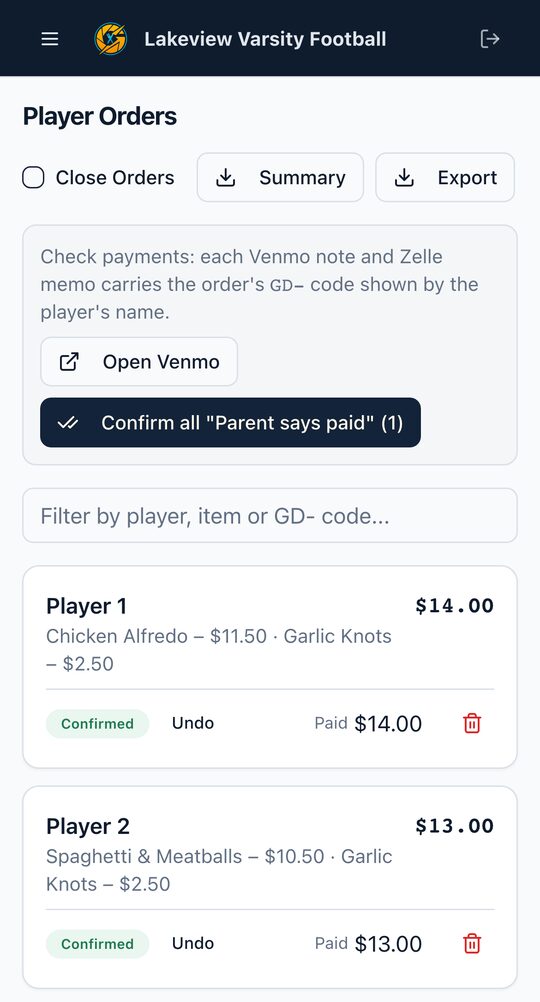
They pick their player's meal and tap to pay you. You confirm payments and send the order to the restaurant.
One real season, start to finish
Last spring our baseball team ran every team dinner through GameDay Dinner.
16
team dinners
306
meal orders
21 of 21
players ordered
$3,541
in orders, paid straight to the team parent
Before that, our team coordinator ran team dinner the way most team parents do: group chat, Messenger and an Excel sheet. I watched every week of chasing orders and payments, so I built something better. I still answer every email myself.
Thomas, founder
thomas@gamedaydinner.comEverything for dinner night, nothing extra
One link, no parent accounts
Parents open the link, pick a meal and they're done. No app, no sign-up.
Pay buttons with the amount filled in
Venmo and Cash App open with the total and a note. Zelle and cash work too. The money goes straight to you.
See who ordered and who paid
Unpaid, "parent says paid", confirmed. One tap to confirm, balances per player.
Roster in seconds
Snap a photo of the roster, upload a spreadsheet, or paste the names.
Send the order to the restaurant
Item counts, each player's order and special requests, emailed or texted in one tap.
Made for your phone
Run the whole dinner from the bleachers.
Simple pricing, no subscription
Try it free, or pay once up front. Parents never pay fees.
Recommended
Season Pass
$49
- 20 team dinners over 6 months
- One-time charge. It won't renew on its own.
- About $2.45 per dinner
Or start free and buy it any time.
Founder's Deal
$97
- 20 team dinners every 6 months, every season
- One-time charge, for as long as we run GameDay Dinner
- Only for the first 100 teams
Pay once, set for every season.
The Two-Dinner Test Drive
Run 2 real team dinners free. No card. If it doesn't earn its keep, you've spent nothing.
Bought a pass and changed your mind? If you haven't set up a dinner with it, email us within 14 days for a full refund. See the Terms.
Questions team parents ask
Set up your team in about a minute
Questions? Thomas, the founder, answers every email: thomas@gamedaydinner.com